There’s a lot of noise in the market right now about Oracle Fusion AI pricing — when billing starts, what triggers costs, and whether running agents in test environments is “safe.” The questions we’re hearing most from clients: Is my 26B production deployment already being metered? What exactly costs money and what doesn’t?
This is a follow-up to our March 2026 post: What’s Free and What’s Not in Oracle Fusion AI Agent Studio. That post covered Oracle’s original model – the embedded vs. custom agent boundary, Per Authorized User and Per Employee subscriptions, and the 200 million token allocation for Oracle-hosted LLMs. Oracle has since replaced that model with a new AI Units-based pricing structure for FY27. If you planned your agent roadmap against the March post, this is the update you need.
Every Fusion Customer Already Has AI Agent Capability. The Question Is What It Costs to Use It
Before worrying about pricing, it helps to understand what you already have. Every Oracle Fusion Cloud subscription includes AI Agent Studio, access to the AI Agent Marketplace, and 20,000 AI Units per month at no additional charge. AI Agent Studio and the Marketplace are part of the standard subscription. You don’t need to purchase anything to start building agents, testing workflows, or exploring what’s available in the Marketplace.
The 20,000 AI Units per month is your base consumption budget. When you stay inside it, which is genuinely achievable if you’re using the right models for the right tasks, there’s no incremental cost at all.
AI Units Are Not All Created Equal: The Action Type Is What Determines Cost
Oracle doesn’t just charge by model tier. It charges by action type, and the combination of action type and model determines what you pay. There are two action categories.
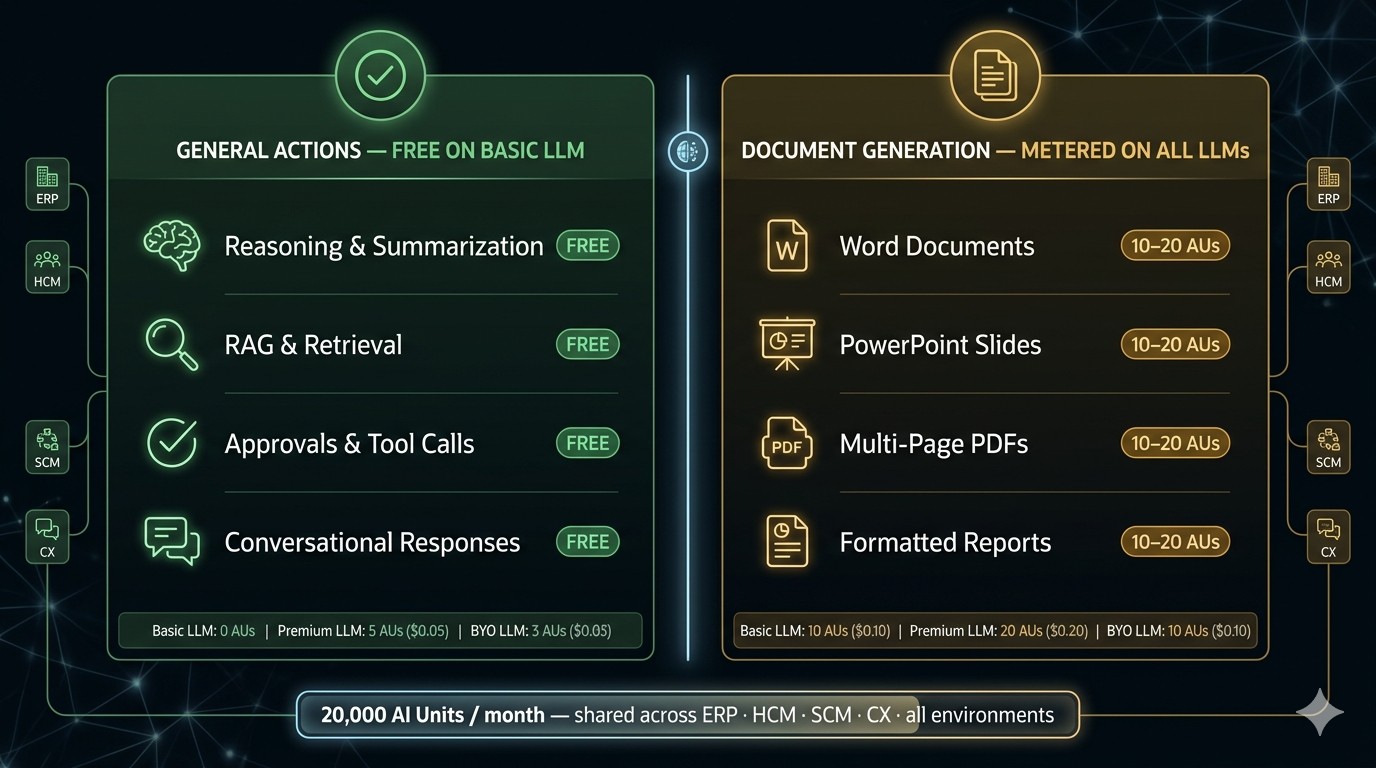
The first is General Actions: reasoning, retrieval, summarization, approval steps, tool calls, and conversational responses. On the Basic LLM (Oracle’s GPT-OSS-120B family), General Actions cost zero AI Units — literally free, regardless of how many queries run. On Premium LLMs like GPT-5 mini, General Actions cost 5 AI Units per action, about $0.05. On a BYO LLM a customer brings themselves, the rate is 3 AI Units.
The second category is Document Generation: producing Word documents, PowerPoint presentations, multi-page PDFs, or similar structured outputs. This is where many teams will be surprised. Document Generation is not free on Basic LLM. It costs 10 AI Units per document on Basic, 20 on Premium, and 10 on BYO. At $0.01 per AI Unit, a single Word document generated on Basic LLM costs $0.10, and on Premium it’s $0.20.
The practical implication: agents that do complex reasoning but never produce document outputs can run on Basic LLM at zero cost. Agents that generate reports, formatted summaries, or presentation materials will consume AUs regardless of which LLM they’re on. If you have finance teams expecting agents to produce formatted close packages or management reports, that is a Document Generation workload and it needs to be in your AU budget.
|
Action Type |
Basic LLM |
Premium LLM |
BYO LLM |
|
General (reasoning, RAG, approvals, tool calls) |
Free |
5 AUs ($0.05) |
3 AUs ($0.03) |
|
Document Generation (Word, slides, PDF) |
10 AUs ($0.10) |
20 AUs ($0.20) |
10 AUs ($0.10) |
The 20,000 AU Pool Is Shared Across Everything — Not Per Pillar, Not Per Environment
This is the detail that changes the math most dramatically for multi-pillar Fusion customers. The 20,000 AI Units per month is one shared pool across all Fusion pillars — ERP, HCM, SCM, and CX combined — and across all environments: production, development, and test.
A customer running Ledger Agent in ERP production, an Expenses Agent in Finance, and an HCM onboarding agent simultaneously is drawing from the same single 20,000 AU bucket. If the HCM team runs Premium LLM queries during month-end close at the same time the ERP team is running reconciliations, they’re competing for the same pool.
There is one exception: if a customer has multiple production environments — separate pods for different business units or regions — each production environment gets its own 20,000 AU monthly allocation. But development and test environments do not get their own allocation. The common assumption that “test is separate” is incorrect. Testing with Premium LLMs or running Document Generation agents in a test pod draws from the same 20K that production runs on.
What Happens When You Run Out of AI Units Is Not What Most People Expect
When you exhaust your 20,000 monthly allocation with no purchased AU pool remaining, what happens depends on what kind of action you’re running. General Actions on Basic LLM continue running — they cost nothing and are unaffected by AU balance. General Actions on Premium LLM and Document Generation actions stop running. Agents don’t fail catastrophically; they simply won’t execute those steps until the monthly allocation resets or additional AUs are purchased.
There’s no scenario in which a Fusion AI deployment generates an unexpected invoice because an agent ran overnight. The risk isn’t financial surprise — it’s operational disruption, because agents relying on premium reasoning or document output will silently stop working when the pool is empty. The mitigation is purchasing AU packs proactively rather than waiting for consumption to hit zero.
Additional AI Unit packs are sold in $1,000 increments, giving you 100,000 pooled AUs that roll over until the end of your subscription term — unlike the monthly 20K allocation, which expires and resets. That rollover behavior makes purchased AUs a sensible buffer strategy: buy ahead of anticipated high-consumption periods and let unused balance carry forward.
Now that you understand how the model works, the next question is what you need to buy — and when those purchasing decisions have already been triggered. That’s covered in Oracle Fusion AI Agents in Production — The Licensing Decisions That Matter.