Oracle Fusion AI Agent Studio 26C brings two changes at once. Studio picked up a substantial set of new capabilities: multiagent orchestration, long-term memory, a CLI, a debugger, deterministic policy logic. And the AI Unit consumption visibility we flagged as coming in Part 2 has actually arrived. The features change what you can build. The dashboard changes whether you can see what building it costs. This post covers both.
This is Part 3 of our Oracle Fusion AI series. Part 1 covers how AI Units and action-type pricing work. Part 2 covers the Agentic Applications platform fee and the still-missing budget caps. This post picks up from there.
The Real Headline: You Can Finally See What You’re Spending
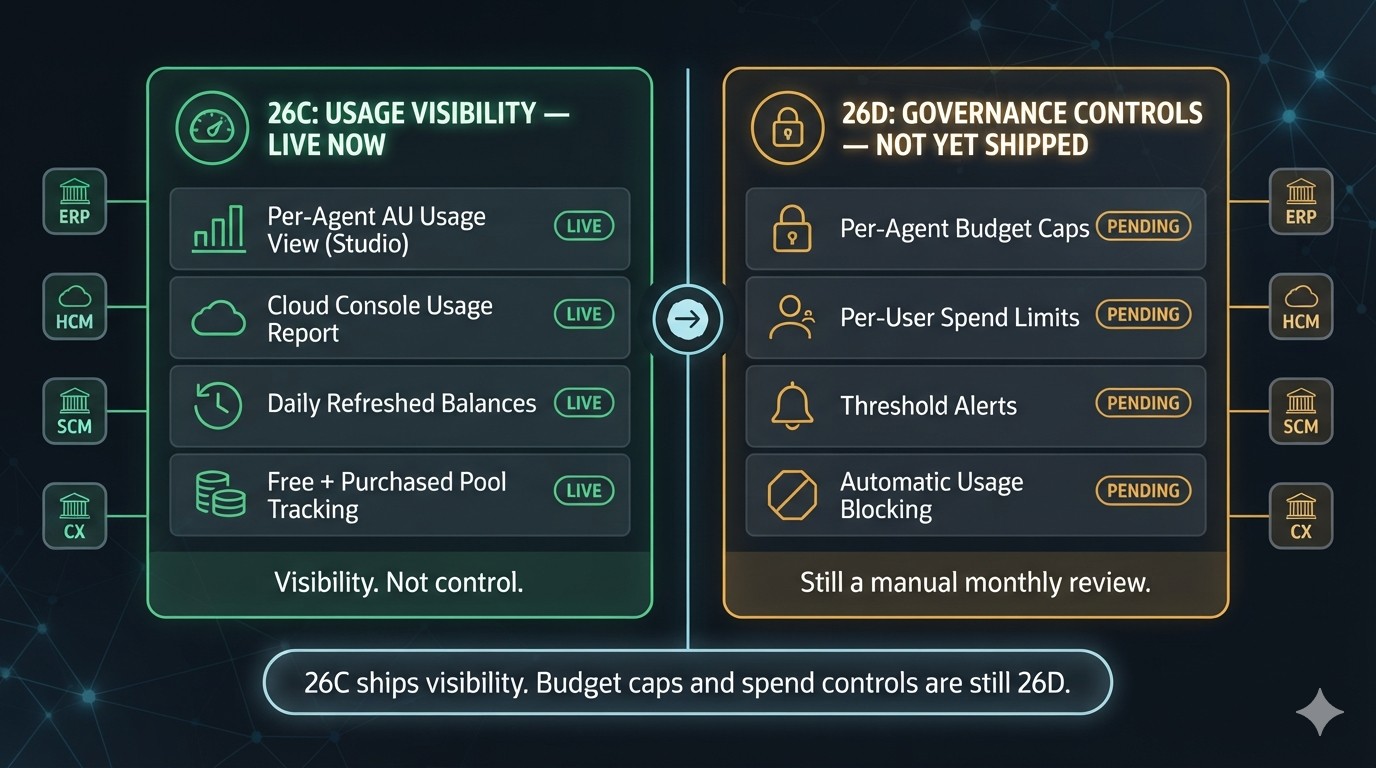
Part 2 flagged the gap directly- no dashboard, no alert, just a manual monthly review. That changes with Oracle Fusion AI Agent Studio 26C. Studio has a new usage and monitoring view with per-agent AU consumption, and Cloud Console has a Fusion usage report showing total usage, free AU balance, and purchased/rollover pool balance, refreshed daily.
This is visibility, not control. Budget caps, per-user limits, and usage blocking are still pointing to 26D, not 26C. Make the dashboard the thing your monthly AU review actually looks at, and start flagging your heaviest agents now, before you have caps to put on them.
One caveat: sources don’t fully agree on when metering actually starts relative to an instance’s 26C upgrade date. Confirm the specifics for your own environment through My Oracle Support rather than relying on release notes alone.
What Else Shipped in Oracle Fusion AI Agent Studio 26C
| Feature | What it does | Cost / governance note |
|---|---|---|
| Multiagent Nodes | Supervisor agent routes requests to specialized worker agents | Each worker invoked adds a metered action |
| Return Nodes | Exits a workflow branch, hands control back upstream | Workflow control — not a new cost driver |
| Reference Blocks | Reusable agents/LLMs/tools, defined once, used everywhere | No cost change, but centralizes where to audit AU-heavy logic |
| Approval Process Channel | Reusable, structured human-approval routing | Workflow control, not LLM reasoning — confirm metering with Oracle |
| Policy Models | Business rules compiled into deterministic executable code | Likely cheaper than LLM judgment |
| Long-Term Memory | Episodic memory notes + shared preferences across sessions | Adds a retrieval step per session |
| Long-Running Sessions | Conversations persist across days | Track AU draw per session, not per calendar day |
| A2A Protocol | Fusion agents call agents on other platforms | Only covers the Fusion side of the exchange |
| CLI for AI Agent Studio | Build/edit/test artifacts from the command line (Claude Code, Codex-assisted) | Design-time |
| Debugger | Trace, breakpoint, and rerun agentic flows | Design-time until it runs against a live model |
| Document Schemas | Extracts structured data from documents (Document Processor node) | Different from Document Generation pricing |
| BYOLLM Enablement Requests | Request additional supported models via MOS service request | Widens model choice; same BYO rate (3 / 10 AUs) |
| AI Configurator Deprecation | Prompt editing consolidates into AI Agent Studio | Migration task, not a pricing event |
Worth a Closer Look
Five of the Oracle Fusion AI Agent Studio 26C updates above carry cost or governance implications that aren’t obvious from the release notes alone.
Multiagent math. Multiagent Nodes mean a single-agent flow generates one set of metered actions per request, but a supervisor-plus-workers flow adds one action for the routing decision plus more for every worker invoked. Default workers to Basic LLM and save Premium for the one agent — usually the supervisor — that genuinely needs it.
Policy Models as cheap governance. Policy Models swap a deterministic function call for a probabilistic LLM call on eligibility checks, calculations, and compliance rules. That’s a better answer for auditors and, in most cases, the cheaper one too.
Memory’s new consumption pattern. Long-term memory retrieval runs a semantic search at the start of every session — check whether that shows up as its own line item in the usage view. Long-running sessions also mean a “session” can now span days, so track AU draw cumulatively, not per calendar interaction.
Design-time vs. metered. The CLI and Debugger are almost certainly free to build and step through, the same way Studio’s prompt-optimization tooling is — but the moment a Debugger run executes against a live model to show a real response, that’s a metered action like any other. A2A raises the cross-platform version of this: your AU pool likely only covers the Fusion side of a handoff, not what runs on the receiving platform.
Document Schemas ≠ Document Generation. Document Schemas extract data from documents; Document Generation (10/20/10 AUs) produces Word docs, decks, and PDFs. Don’t assume extraction is free just because it isn’t generation — confirm the rate with Oracle.
What to Actually Do
First, open the new Studio usage view and Cloud Console usage report this week — use real numbers instead of estimates.
Second, default multiagent workers to Basic LLM; reserve Premium for the one agent that needs it.
Third, move deterministic rules into Policy Models instead of LLM judgment.
Fourth, before pricing a business case around Document Processor extraction or A2A calls, get Oracle to confirm how each is metered — don’t assume either is free.
Oracle Fusion AI Agent Studio 26C reads like a platform-engineering release, and mostly it is. But it shipped alongside the consumption visibility Part 2 was waiting on, and the two are connected — every new orchestration primitive is a new way to spend AI Units, and the dashboard is the first tool you have to watch it happen. Real caps are still 26D. Until then, visibility plus the choices above are what you’ve got.