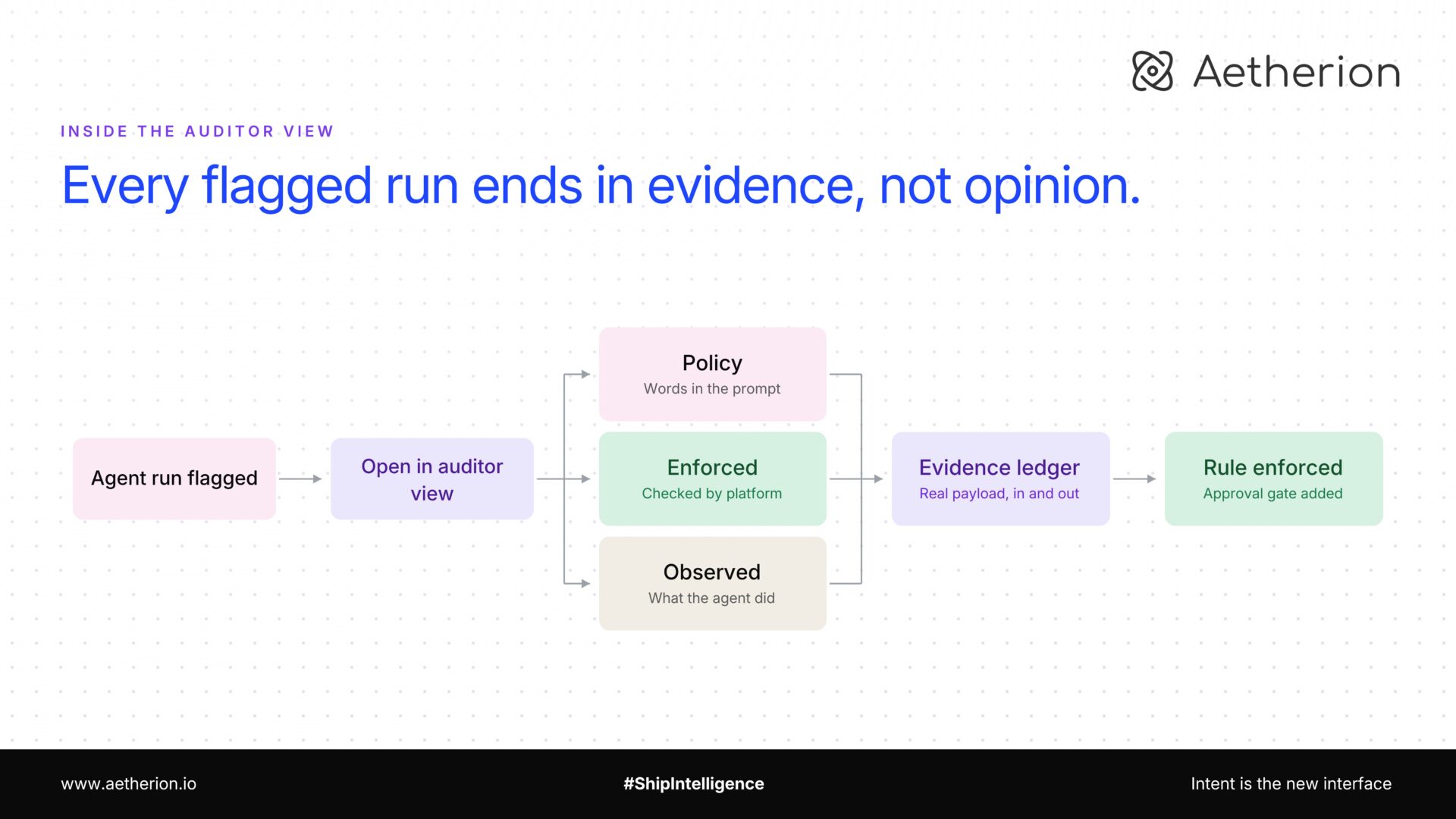
When something goes wrong with an agent, most platforms give you two options: a log search that needs an engineer, or a summary someone wrote after the fact. Auditor View is a third option. You flip a toggle on the Agent Runs page, open the run, and read what happened: what the agent was told, what we enforced, and what it actually did.
What is it?
Auditor View is a second view of your agent runs. Default View is the working list: your runs, their status. Auditor View is the review list, with stats, filters, and export across every run you’re cleared to see. Each run opens with its policy, its approvals, and its costs attached.
Inside a run, the Activity tab becomes the Evidence Ledger. Same run, same steps, but every step can be opened to show the real payload that went in and the real payload that came out.
You don’t reconstruct what happened. You read it.
Who is it for?
Risk and compliance teams who have to sign off before an agent touches anything that matters. They open the run themselves instead of filing a request and waiting for someone to pull logs.
Ops leads who own the process and get asked to explain it. The run names the person who approved each step, not “an approval was recorded.”
Engineers, because it isn’t a logging pipeline anyone has to maintain. Every agent on Aetherion checkpoints each step to survive a crash and resume. A platform that already persists every step in order, with its inputs and outputs, is already the record.
And if you’ve ever had an agent do something you couldn’t explain a week later, this fixes that specific problem. You find the step that did it, and the reason it was allowed to.
What a real audit looks like?
Take the refund agent. It checks the order, decides if it qualifies, drafts a reply, and loops in a human before anything goes out. It ran 400 times last month. One refund went out that shouldn’t have.
Find the run. On the Agent Runs page, switch Default View to Auditor View. The list gains stats, filters, and export. Filter to that agent and that day, and open the run.
Read the Controls & Policy panel. It’s split into three groups, and every row is tagged with where it came from.
Under Policy, tagged Agent prompt: no refund over $500 without approval. That line is pulled live out of the agent’s own prompt.
Under Enforced, tagged Enforced: PII redaction: On – Email, Phone, Credit Card. That’s what the platform applied regardless of the prompt.
Under Observed, tagged Observed: Tools invoked: order-lookup, draft-reply, issue-refund.
Now look at what isn’t there. The $500 rule is in the Policy group. It is not in the Enforced group. The rule existed as a sentence in a prompt and nothing outside the model was checking it.
Confirm it. The Clarifications & Approvals panel reads: No human clarifications or approvals in this run. The agent never stopped. Open a run that worked and the same panel shows a card with Approval request, Answered, the exact question that was asked, Asked 09:14, and underneath, Approved by priya@yourcompany.com at 09:16. A real identity and both timestamps, captured when it happened.
See the actual data. In the Evidence Ledger, click the issue-refund step. Its input and output open in full: the order, the amount, the response. The card number is already masked, and so is anything whose field name looks sensitive, so a token doesn’t leak just because a scanner didn’t recognise the shape of it.
Check the bill. Tokens & Cost shows the run in dollars, per model, labelled Actual cost when the number came back from the gateway and Estimated cost when it was priced from a rate card.
Nobody reconstructed any of that. The run already knew.
Then fix it properly. Move the $500 rule out of the prompt and declare it as a real approval gate. Re-run the agent, open it again, and the rule now appears under Enforced instead of Policy, with an Approval request card in Clarifications when it fires.
Who can open it
Auditor View is its own permission, agents:view_audit, separate from the permission to see agents at all. An auditor role gets read access plus the audit add-on, enough to review any run in scope and nothing else.
It’s enforced at the API, not hidden in the UI. The auditor-only endpoints require both permissions, and asking for runs beyond your own is rejected server-side without the audit permission. A view you could unlock by flipping a toggle in devtools wouldn’t be a control, and compliance teams are right to ask which one it is.
See it on your own run
Take the agent you’d least like to explain line by line six months from now. Run it, then open it in Auditor View.
Bring us the process your compliance team keeps blocking. We’ll show you what it looks like when it runs start to finish and leaves a record, you’d hand an auditor. No log search. No reconstruction.
Aetherion. From intent to impact.
Follow along as we share more of what we’re building at Aetherion. If this resonates with something your team is dealing with, we’d love to talk to you!