Most “build your own AI agent” tools give you two options: a chat box that produces something you can’t see or steer, or a developer SDK that needs an engineer to touch it. Agent Canvas is a third option. You build the agent by connecting steps on a screen, watch it run, and fix it in place.
What is it?
Agent Canvas is a drag-and-drop workspace for building AI agents. You drop steps onto a canvas (an input, a tool call, a decision, a loop, an output) and connect them into a flow. Every step is visible. Every connection is a line you drew.
When something’s wrong, you don’t dig through logs. You click the node and look.
An agent built this way is a diagram of exactly what happens, in order, that anyone on the team can read.
Who is it for?
Ops and business teams who know a process cold, whether that’s refund handling, lead routing, or ticket triage, build the flow themselves instead of filing a ticket and waiting on engineering.
Technical teams get the scaffolding done fast, with every part still editable. Canvas doesn’t hide logic behind a prompt: every tool call, condition, and data field is a node you can open and inspect.
And if you’ve ever watched an AI agent do something you couldn’t explain afterward, Canvas fixes that specific problem. You can trace a bad output back to the exact step that produced it.
What a real build looks like?
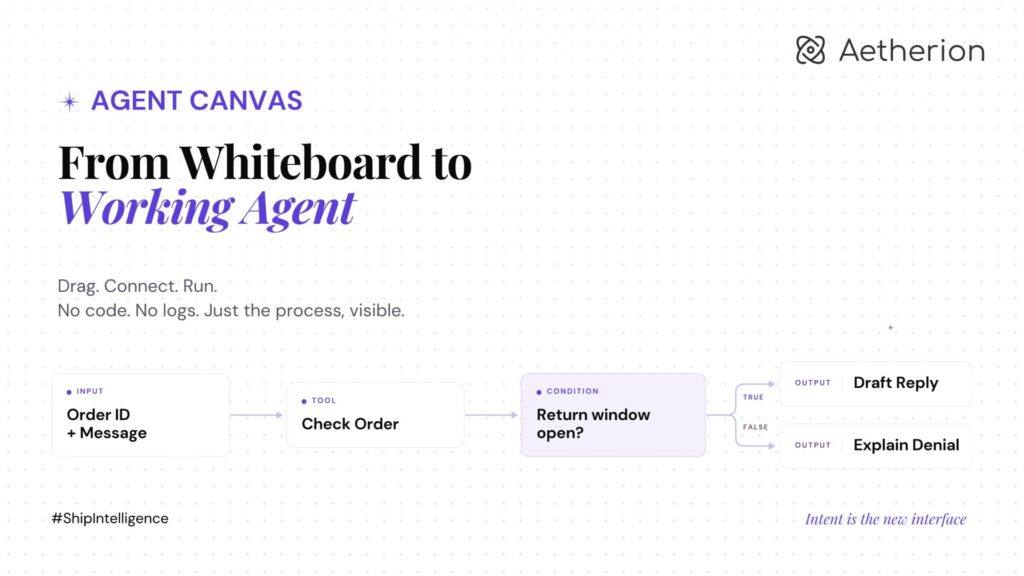
Say you want an agent that handles refund requests: check the order, decide if it qualifies, draft a reply, and loop in a human before anything goes out.
Build it yourself. Canvas opens to an Inputs node, where every agent starts by defining what comes in, here, a customer’s order ID and message. Drag an order-lookup tool from the Tools Library panel on the left and drop it on the canvas. Click the node, and a configuration panel opens on the right: map the order ID from your input into the tool’s field.
Drag in a Conditions node next and set the rule: return window still open? It exposes two handles, True and False. Draw a line from each into what happens next. On True, a tool call drafts a reply and routes it to a human for approval before sending. On False, a different reply explains why the refund doesn’t qualify. Wire an Outputs node to close the loop, hit Run, and watch it execute step by step, right there on the canvas.
None of that required code. It required knowing the process.
Or describe it and let Aether build it. Tell Aether what you want in plain English: “When a customer requests a refund, check the order, and if it’s within the return window, draft a reply and get my approval before sending.”
Aether writes a plan first: what the agent does, which tools it needs, the execution flow it’s proposing, a checklist for going live. Ask for changes right there in plain text: “also post it to our support channel before sending.” Aether revises the plan. Approve it, and Aether builds the canvas: every node placed, every connection drawn, matching what you signed off on.
From there it’s the same workspace. Click Test my Agent, watch the run preview step through the flow, tweak a node if something’s off, test again. When it behaves the way you want, publish it.
Built for how work actually happens
Agents don’t wait for someone to remember to ask. Trigger one from a chat mention, run it on a schedule, or wire it to fire when something happens in a connected app: Slack, Gmail, Jira, Salesforce, GitHub. Same agent, same canvas, different way of waking it up.
Bring us the workflow that keeps breaking. We’ll show you what it looks like when it runs start to finish. No babysitting. No cleanup.
Aetherion. From intent to impact.
Follow along as we share more of what we’re building at Aetherion. If this resonates with something your team is dealing with, we’d love to talk to you!