The adoption of Groovy scripting within Oracle Fusion is not just a technical enhancement; it’s a strategic opportunity to streamline, automate, and elevate your business processes.
By embedding business logic directly into the application layer, Groovy empowers organizations to reduce reliance on external customizations, enforce real-time validations, and drive consistency across transactions.

This shift encourages a re-evaluation of traditional process extensions—replacing bulky workflows and external logic with agile, embedded scripts that align with Oracle’s best practices.
Whether it’s defaulting values, validating data entries, or dynamically adjusting field behaviour, Groovy scripting offers a simplified yet powerful framework to enhance user experiences and operational efficiency.
What is Groovy Script?
Groovy is a dynamic, object-oriented scripting language for the Java platform.
It is known for its concise syntax, seamless integration with Java, and ease of use for automation, customization, and business logic.
- It’s lightweight and flexible.
- It integrates well with Java-based Fusion applications.
- It allows business users (not just developers) to write rules and logic without modifying the underlying code.
In the context of Oracle Fusion Applications, Groovy is embedded within the Application Composer (mainly in Oracle Fusion Cloud HCM, CX).
In Oracle Fusion Order Management, a separate task “Manage Order Management Extensions” is given in setup and maintenance where we can write Groovy Script to invoke it on “Save”, “On Start of Submission Request”, or “On End of Submission Request”.
Where You Typically Use Groovy
- Set default values
- Perform validations
- Control UI behavior
- Trigger workflow actions
- Add custom logic to fields
Syntax Basics of Groovy
- Variables
- Conditional statements (if, else)
- Loops
- Common Fusion object functions (like getAttribute, setAttribute)
Best Practices
Simplicity & Readability
Keep your scripts simple and easy to read.
Use meaningful variable names and a clear structure.
Use Comments
Add comments to explain complex logic or the purpose of a script section for future reference.
Avoid Hardcoding
Wherever possible, avoid hardcoding values.
Use lookups or profile options to make scripts more maintainable.
Reuse Logic
Create functions for logic that is used in multiple places to promote reusability and simplify maintenance.
Sample Use Case
When entering a sales order, the order currency must be selected manually from a list of values, which can include up to 160 currencies.
In most cases, a common currency is used.
To streamline data entry, an Order Management extension can be implemented to default the sales order currency to this commonly used value.
Users still retain the flexibility to override the default and select a different currency, if required.
The extension is designed to respect such manual overrides and will not overwrite a user-selected currency.
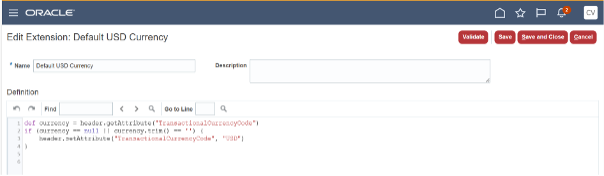
In the example below, we are defaulting the currency to USD.
Groovy Script
def currency = header.getAttribute("TransactionalCurrencyCode")

if (currency == null || currency.trim() == '')
{
    header.setAttribute("TransactionalCurrencyCode", "USD")
}
Order Management Extension Screen