
Back-to-Back orders are a core order fulfillment feature in the era of Agentic AI where users expect quick solutions to complex problems.
Oracle’s strategy of embedding in-built AI apps in Fusion on top of cutting-edge AI infrastructure is made possible by its decades of experience across on-premises and Cloud ERP application business.
This post describes an approach for enabling back-to-back orders in SCM Fusion.

Customer order fulfillment can be supported by on-hand material availability, placing a Purchase Order on one of the approved suppliers, manufacturing in-house products, or transferring from an internal warehouse where products are stored.
Supply Chain Orchestration feature supports fulfillment through a combination of ATP Rules, Sourcing Rules, Assignment Sets, and Item attribute setups.
Back-to-back orders create a link between sales order and the supply source.
Supply is always reserved to a sales order line.
Back-to-back orders are primarily used for fulfillment of items that are usually low-volume but high-value and not typically stocked.

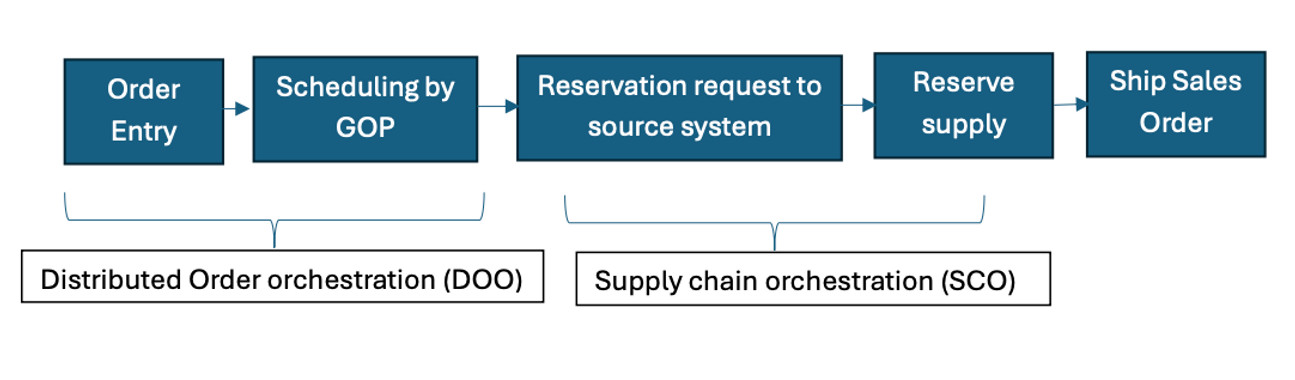
Supply Chain Orchestration takes over from Distributed Order Orchestration after scheduling by Global Order Promising (GOP) with the creation of Supply Order and request for reservation of supply from source systems like Inventory for on-hand or transfer orders, Manufacturing for work orders, and Procurement for purchase orders.
Setups for Enabling Back-to-Back Fulfillment
- Item should be set up as back-to-back enabled in Sales & Order Management → Item Specifications under Org Item Setup.
- Create Available to Promise (ATP) rule with promising mode as Supply Chain Availability Search.
- Sourcing rules setup in GOP:
- Global sourcing rule for fulfillment from default warehouse.
- Local sourcing rule for transfer from another warehouse to default warehouse.
- Items to be fulfilled need to have a Work Definition specified in Manufacturing.
- Work Definition must have Use in Planning option enabled for it to be used in the data collection process.
- Buy items need to have a BPA (Blanket Purchase Agreement) setup with a supplier; assign supplier site to Procurement BU.
- BPA must have these options checked:
- Automatically generate orders
- Automatically submit for approval
- Customer Sales Order Fulfillment feature in Procurement offering needs to be enabled.
- Back-to-back fulfillment needs to be enabled.
- Transfer Orders need inter-organization parameters to be set up between the source and destination organizations.
- Supply Chain Financial Orchestration Transfer Pricing Rules need to be set up to determine transfer price between organizations.
- Item cost profiles and cost elements need to be set up.
Back-to-Back orders enable cost-effective fulfillment of high-cost but slow-moving items and prevent misallocation of supply due to tight integration between supply and demand.
They are an excellent tool for centralized control over the fulfillment process.